In Part 1 we turned on SEMANTIC ranking in Optimizely Graph and it worked: a search for “winter tyre safety” returned Driving Safely in Snow and Ice — a page that never uses the word “tyre“.
Then the results came back like this:
[
  { "Title": "Driving Safely in Snow and Ice",  "_score": 6.41 },
  { "Title": "Winter Sale: Tyre Storage Racks", "_score": 6.28 }
]
Two results, 0.13 apart, ranking for opposite reasons. The first matched on meaning — exactly what semantic search is for. The second is a keyword coincidence: “winter” and “tyre” both appear, but the page sells shelving.
_score doesn’t tell you which is which. So when results look off, you nudge _semanticWeight up, then down, and squint at the output. That’s guessing.
The fix: under SEMANTIC ranking, _score isn’t a measurement — it’s a blend of two signals mixed in a ratio you chose. A textual score and a semantic score, flattened into one float. Graph never hands you the two halves, but nothing was destroyed, only combined. Run the same query at two different weights and you can pull it back apart.
That’s what this post builds. We’ll get to exactly how the two scores are computed and recovered in the sections ahead — here’s the payoff you’re working toward:
| Title | Textual | Semantic | Blended |
|---|---|---|---|
| Driving Safely in Snow and Ice | 1.92 | 8.34 | 6.41 |
| Winter Sale: Tyre Storage Racks | 8.71 | 5.24 | 6.28 |
One extra query, and the storage rack has nowhere to hide.
One query, two weights
Everything rests on a single query. Same filter, same search term, run twice — the only difference is _semanticWeight:
query ScoreSplit($q: String!, $w1: Float!, $w2: Float!) {
  low:  CKExperienceType(
          where: { Title: { exist: true } _fulltext: { match: $q } }
          orderBy: { _ranking: SEMANTIC, _semanticWeight: $w1 }
        ) { items { _score Title } }
  high: CKExperienceType(
          where: { Title: { exist: true } _fulltext: { match: $q } }
          orderBy: { _ranking: SEMANTIC, _semanticWeight: $w2 }
        ) { items { _score Title } }
}
Three things worth noticing:
lowandhighare GraphQL aliases — two selections of the same type in one document. One request, one round trip, one index state. Fire them as separate calls and you risk the index shifting between them.- The
whereclause is identical in both. Same candidate set, same matching. Nothing varies except the ranking. $w1and$w2are the whole experiment. Everything else is held still on purpose.
Running it
{ "q": "winter tyre safety", "w1": 0.3, "w2": 0.8 }
{
  "data": {
    "low": {
      "items": [
        { "Title": "Winter Sale: Tyre Storage Racks", "_score": 7.67 },
        { "Title": "Driving Safely in Snow and Ice",  "_score": 3.85 }
      ]
    },
    "high": {
      "items": [
        { "Title": "Driving Safely in Snow and Ice",  "_score": 7.06 },
        { "Title": "Winter Sale: Tyre Storage Racks", "_score": 5.93 }
      ]
    }
  }
}
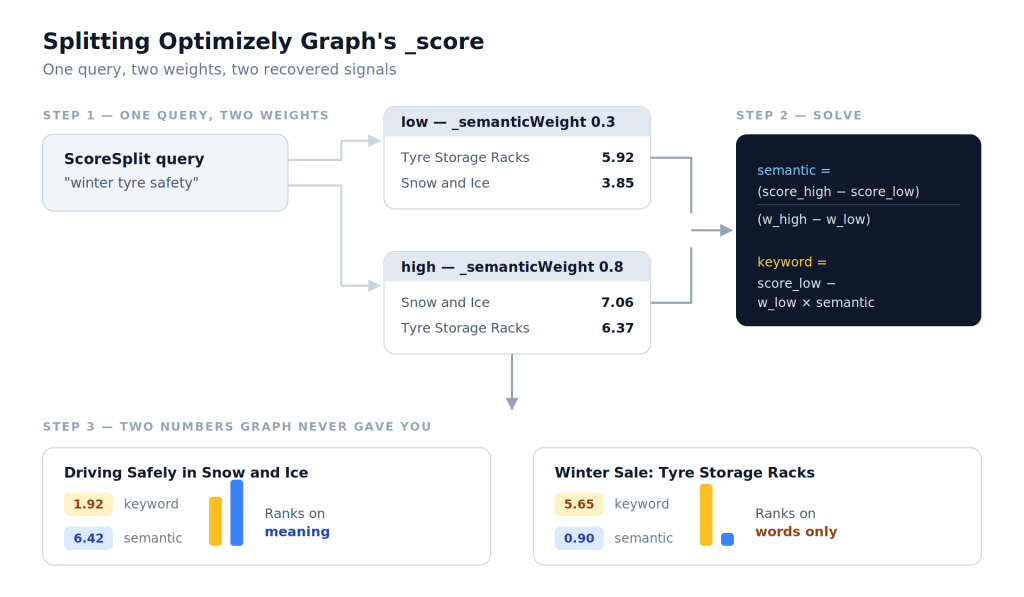
Read it side by side:
| Title | _score @ 0.3 | _score @ 0.8 | Movement |
|---|---|---|---|
| Winter Sale: Tyre Storage Racks | 5.92 | 6.37 | +0.45 — barely moves |
| Driving Safely in Snow and Ice | 3.85 | 7.06 | +3.21 — climbs hard |
Both scores rise as you turn the semantic dial up. What differs is how much. The storage racks shrug — more semantic weight barely helps them, because they have almost no semantic relevance to give. The snow-and-ice page nearly doubles, because meaning is the only thing it has.
And that difference in reaction is enough to flip the ordering: racks lead at 0.3, snow leads at 0.8.
The same content. The same query. Two different lenses.
Recovering the two scores
You have the same result scored at two known weights. That’s all you need:
semantic = (score_high - score_low) / (w_high - w_low)
keyword  =  score_low - w_low * semantic
The first line reads how hard the result reacted to the weight change — that reaction is the semantic signal. The second rewinds the low reading back to zero weight, leaving the keyword signal standing alone.
Worked through
From the ScoreSplit run (w_low = 0.3, w_high = 0.8):
Driving Safely in Snow and Ice — 3.85 → 7.06
semantic = (7.06 − 3.85) / (0.8 − 0.3) = 6.42
keyword  =  3.85 − 0.3 × 6.42          = 1.92
Winter Sale: Tyre Storage Racks — 5.92 → 6.37
semantic = (6.37 − 5.92) / (0.8 − 0.3) = 0.90
keyword  =  5.92 − 0.3 × 0.90          = 5.65
| Title | Keyword | Semantic |
|---|---|---|
| Driving Safely in Snow and Ice | 1.92 | 6.42 |
| Winter Sale: Tyre Storage Racks | 5.65 | 0.90 |
The snow page is carried almost entirely by meaning. The storage racks are carried almost entirely by words — a semantic score of 0.90 says the embedding knew all along that shelving isn’t tyre safety.
Now you can predict any weight
Once you hold both halves, you don’t need Graph to tell you what happens at a given _semanticWeight. You can compute it:
score(w) = keyword + w × semantic
For Driving Safely in Snow and Ice (keyword 1.92, semantic 6.42):
w | Calculation | Predicted | Graph returned |
|---|---|---|---|
| 0.3 | 1.92 + (0.3 × 6.42) | 3.85 | 3.85 |
| 0.8 | 1.92 + (0.8 × 6.42) | 7.06 | 7.06 |
And for Winter Sale: Tyre Storage Racks (keyword 5.65, semantic 0.90):
w | Calculation | Predicted | Graph returned |
|---|---|---|---|
| 0.3 | 5.65 + (0.3 × 0.90) | 5.92 | 5.92 |
| 0.8 | 5.65 + (0.8 × 0.90) | 6.37 | 6.37 |
Which is where it stops being a theory. The split reproduces the exact scores it was derived from, and every other weight we tested lands the same way — across every result and every weight, the largest discrepancy was 0.00001. Floating-point dust. The split isn’t an approximation of what Graph is doing; it is what Graph is doing.
Two queries at two weights, and you can now answer “what would the ranking look like at 0.5?” without asking Graph at all.
What this actually buys you
Two numbers per result. Here’s what you do with them.
1. You can see where the ranking flips
We know both results at every weight, because we already have their keyword and semantic halves. Lay them side by side:
_semanticWeight | Snow and Ice | Tyre Storage Racks | Winner |
|---|---|---|---|
| 0.30 | 3.85 | 5.92 | Racks |
| 0.60 | 5.77 | 6.19 | Racks |
| 0.65 | 6.09 | 6.24 | Racks |
| 0.70 | 6.41 | 6.28 | Snow and Ice |
| 0.80 | 7.06 | 6.37 | Snow and Ice |
The flip happens between 0.65 and 0.70. That’s not a hunch — it’s the whole table, from one ScoreSplit run.
If you’re shipping _semanticWeight: 0.6, you now know you’re sitting on the wrong side of that line for this query, and exactly how far you’d have to move.
2. The dial-turning session disappears
Every row above was computed, not fetched. Two queries gave you the full picture across the whole weight range — so instead of running Graph again for each guess, you build the table once and read the answer off it.
3. A bad result and a bad weight look different
| Keyword | Semantic | Verdict | Fix |
|---|---|---|---|
| High | Low | Word coincidence — the racks | Raise the weight |
| Low | High | Why you turned semantic on | Don’t lower it |
| High | High | Genuinely relevant | Nothing |
| Low | Low | Noise | Fix the where clause, not the weight |
That last row is the one people get wrong. If everything is low on both, no weight will save you — that’s a filtering problem wearing a ranking problem’s clothes.
4. It audits your content, not just your query
Good pages coming back with a flat semantic score across unrelated queries aren’t a weight problem. That’s thin titles and missing summaries showing up in the numbers. The split turns “semantic search feels off” into something you can point at.
The shift
You stop asking “does 0.7 feel right?” and start asking “at what weight does the content I want to win, win?”
One of those has an answer.
Final Thoughts
Semantic search arrives feeling like magic, and magic is a terrible thing to run in production. You can’t debug it, you can’t defend it in a review, and when someone asks why a page about shelving outranked a page about safety, “the embeddings decided” is not an answer.
The nice thing about _score is that it was never magic. It was two honest numbers, added together, with a weight you chose. All this post did was ask Graph the same question twice and let the arithmetic do the rest.
What changes afterwards is smaller than it sounds, and better than it sounds. You stop nudging _semanticWeight and hoping. You start looking at a result, seeing 5.65 keyword against 0.90 semantic, and knowing precisely what you’re dealing with — a title that got lucky with two words.
That’s the real upgrade. Not a better ranking. A ranking you can explain.
Two queries. One subtraction. No more guessing.
Happy Optimizing!!!


One thought on “Tuning Semantic Search in Optimizely Graph by Splitting the Score”