A contract in Optimizely CMS is a shared set of fields. You define them once. Any content type that extends the contract gets those fields automatically.
That keeps your model consistent. The next question is how flexible it still is.
If several components extend the same contract, can each one change the shared fields? A different label. A different length. Different allowed types. Even whether a field is required.
We tested that with a shared contract, a few components that extend it, and a push to CMS.
Some overrides were accepted. Some were rejected. CMS treats the field’s identity — type, required, indexing — as part of the contract. Editor-facing settings can change per content type.
This post is the result: what you can override on a contract field, and what you cannot.
How extension works
A content type opts into a contract with extends. Every field on the contract is copied onto that type.
To change a shared field, redeclare it with the same property name. CMS keeps the field. The new settings replace the ones from the contract — but only where CMS allows it.
export const CardComponent = contentType({
  key: 'CardComponent',
  displayName: 'Card',
  baseType: '_component',
  extends: [CommonCardContract],
  properties: {
    heading: {
      displayName: 'Card heading',
      maxLength: 40,
    },
  },
});
heading still comes from the contract. This type only changes the label and the length.
The property name must match. Change the name, and it is a new field — not an override. Change type, and CMS will reject the push. The next sections list which settings survive, and which do not.
What you can override
These settings can differ on the content type. CMS accepts them on push, and they show up on the type in the CMS.
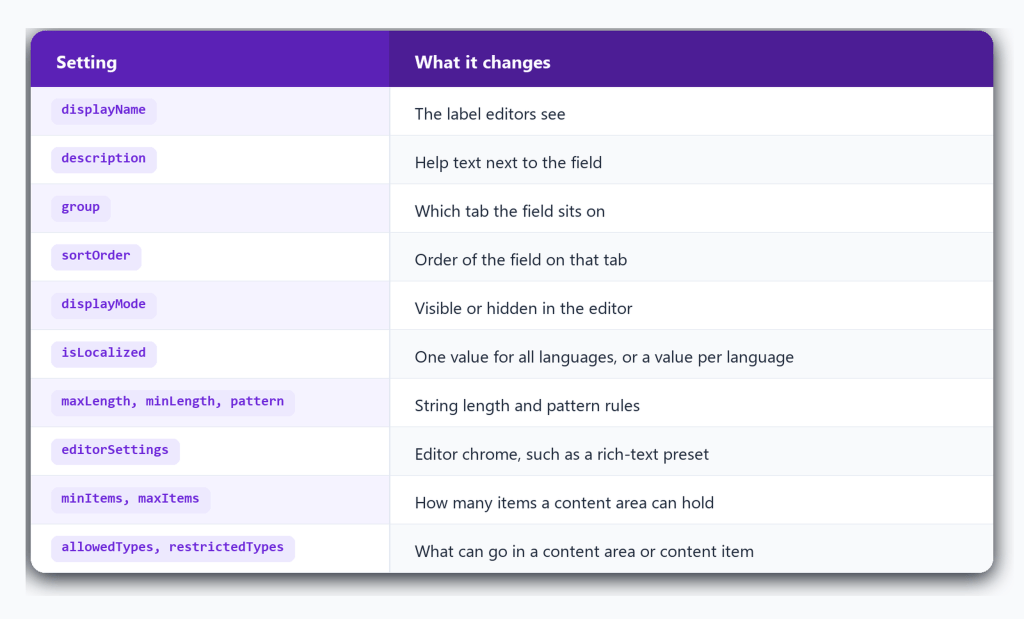
A typical override is the content area: the contract allows one set of types, and each component narrows that list and sets its own min and max.
isLocalized can change, but flipping it from true to false is a breaking change. A normal push is rejected until --force is used.
The field is still the same field. Only these settings move. Type, required, and indexing do not — that is next.
What CMS will block
These settings are part of the field’s identity. If they differ from the contract, the push fails.
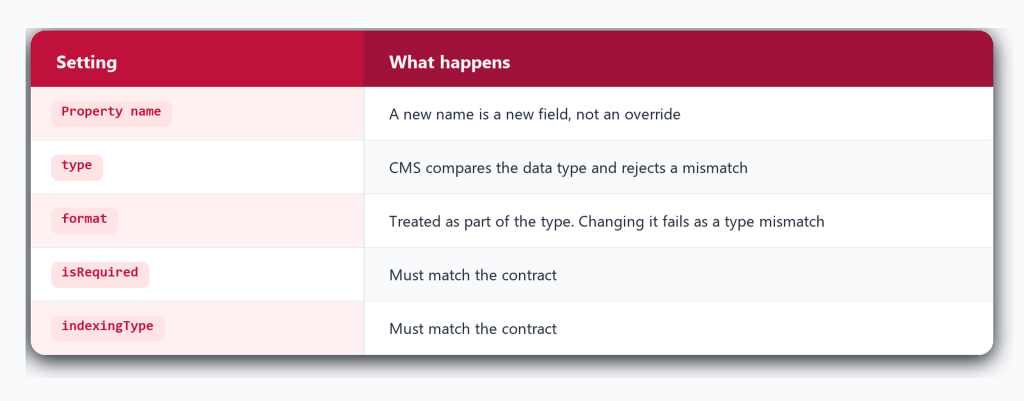
The errors are direct:
- Property ‘heading‘ on contract ‘X’ has required False while the content type property has required True
- Property ‘description‘ on contract ‘X’ has indexing type Default while the content type property has indexing type Searchable
- Property ‘heading‘ on contract ‘X’ is of type ‘String’ which does not match the type ‘LongString‘
The contract owns the shape of the field. The content type can restyle it. It cannot redefine it.
Override it in code
Extend the contract, then redeclare the same field name with only the settings that should change.
A small helper copies the contract field first, applies those changes, and keeps type, isRequired, format, and indexingType as they are on the contract:
export function overrideContractProperties(contract, overrides) {
  const result = {};

  for (const name in overrides) {
    const field = contract.properties[name];
    const changes = overrides[name];

    result[name] = {
      ...field,
      ...changes,
      type: field.type,
      isRequired: field.isRequired,
      format: field.format,
      indexingType: field.indexingType,
    };

    if (changes.items) {
      result[name].items = { ...field.items, ...changes.items };
    }
  }

  return result;
}
Use it on the content type like this:
export const CardComponent = contentType({
  key: 'CardComponent',
  displayName: 'Card',
  baseType: '_component',
  extends: [CommonCardContract],
  properties: {
    ...overrideContractProperties(CommonCardContract, {
      heading: {
        displayName: 'Card heading',
        maxLength: 40,
      },
      contentArea: {
        minItems: 1,
        maxItems: 2,
        items: {
          allowedTypes: [CarouselBlock],
        },
      },
    }),
  },
});
heading is still the contract heading — only the label and length change. contentArea is still the contract content area — only the allowed types and item limits change. Extra fields that belong only to this component go next to the spread.
Final Thoughts
A contract is the shared shape of a field. The content type can change how that field looks and what it accepts — label, help text, group, limits, allowed types. It cannot change what the field is.
Keep the property name and type the same. Leave isRequired, indexingType, and format on the contract. Override the rest, then push. CMS is the source of truth: if a setting is illegal, the error names the field and the mismatch.
That split is the whole point of extending a contract. Share the model. Tune the editor. Do not fork the type.
Happy Optimizing!!!
 Lets unveil Optimizely