If you work with @optimizely/cms-sdk, you already know this file.
You have a catch-all, something like app/[lang]/[...slug]/page.tsx. You build the CMS path from the URL, call getContentByPath, and render with OptimizelyComponent. Nothing in Graph? notFound(). Preview token and key on the query string? getPreviewContent instead.
That is the CMS page. It works. The part most of us skip: when that Graph call actually runs.
Next.js can prerender the catch-all at build time, or on the first visit, and then keep that render. Your code still says getContentByPath. It just ran too early. Next stored the HTML (and the RSC payload) and serves that snapshot again. Publish in CMS, Graph has the new page, the site can still show the old one. If Graph returned nothing the first time, Next can store the 404 too. Same trap.
That’s why these two Next.js APIs show up in Optimizely apps. They are not Graph methods. They only change the clock.
export const dynamic = 'force-dynamic'sits on the route. Next will not prerender this page. Every request runsgetContentByPath(or preview) again.await connection()sits in the code. Next prerenders until that line. Everything after it waits for a real visitor, then Graph runs.
Same catch-all. Same Graph call. Different clock.
What prerender actually stores
You know getContentByPath. You hit /en/about. Graph returns the page. It shows up. Fine.
Now ask yourself: did that call run just now, or did Next.js already run it and save the answer?
That saved answer is prerender. Next does not save the Graph query. It saves the page it already built — the HTML, and the React payload behind it. Next visit can skip Graph and send that saved page.
So you publish a new heading in CMS. Graph has it. The site can still show the old heading. Your catch-all did not fail. Next is still holding the old render.
Same story with a miss. Graph returns nothing. You call notFound(). That 404 is also a page Next can save. You fix the content. Graph is good. The URL still 404s. You are looking at a saved miss, not a live Graph call.
If you also have generateStaticParams, build time is when this often happens. Next asks Graph for page URLs, then builds those routes. You think you only listed paths. You also froze whatever Graph returned that day.
Prerender means: freeze this CMS response now. Serve it later.
force-dynamic and connection() do not change Graph. They only decide if Next is allowed to freeze it.
force-dynamic: the whole route, every time
Remember that catch-all? Add one line at the top of the same file:
export const dynamic = 'force-dynamic';
That is a Next.js route setting. Not a Graph API. Not an SDK helper. It tells Next: do not prerender this page. Render it on every request.
So /en/about comes in. Next runs your page. getContentByPath hits Graph now. You publish. The next request hits Graph again. You get the new heading. If Graph was empty last time, you are not stuck with a saved 404. This request asks again.
Preview lives here too. getPreviewContent needs preview_token and key on the query string. Those exist on a real request. force-dynamic keeps that path on the request clock, same as published pages.
What you traded: Next no longer freezes this route. Every visit pays for a Graph call. That is the point of the hammer.
Put it on the page, next to getContentByPath. That is the CMS catch-all. You are not changing Graph. You are changing the clock for that route.
connection(): prerendering stops here
force-dynamic was a switch on the file. connection() is a line in the function.
It comes from Next.js, not the CMS SDK:
import { connection } from 'next/server';
Official meaning is one sentence: wait for a real visitor, then continue. Next’s own comment is the same: await connection() — prerendering stops here. Everything after that line runs on the request. Everything before it can still be built ahead of time.
So on your catch-all, the line that matters is where you put it.
export default async function CmsPage({ params }) {
  const { lang, slug } = await params;

  await connection(); // stop. wait for a real request

  const results = await client.getContentByPath(`/${lang}/${slug.join('/')}`);
  // this Graph call runs now, for this visitor
}
Read it top to bottom, like Next does.
- Next starts prerender.
- It can run the work above
await connection(). - It hits that line and stops.
- A visitor shows up.
getContentByPathruns. Graph answers for this request.
Move Graph above connection() and you are back to the old trap: Next can freeze that result. The stop line only protects what comes after it.
That is the whole difference from force-dynamic:
force-dynamic— this route is always request-time. No freeze.connection()— freeze is allowed until this line. Then Graph waits.
If you put await connection() in a layout, the layout waits, and so does everything inside it. If you put it only in the CMS page, only that page waits. Same API. Different reach.
You do not need connection() if the page already uses something request-only, like cookies() or headers(). Next already has to wait. Use it when Graph is the only reason you must not prerender — and you want to say exactly where prerender ends.
So which one goes on your catch-all?
Same Graph. Same getContentByPath. Two clocks. Pick one.
Ask yourself one question: do I want the whole CMS page to wait, or only the line after a stop?
- Whole page, every visit, no freeze →
force-dynamic - Build what you can, then wait, then Graph →
await connection()
That is the whole decision.
The difference, in one picture:
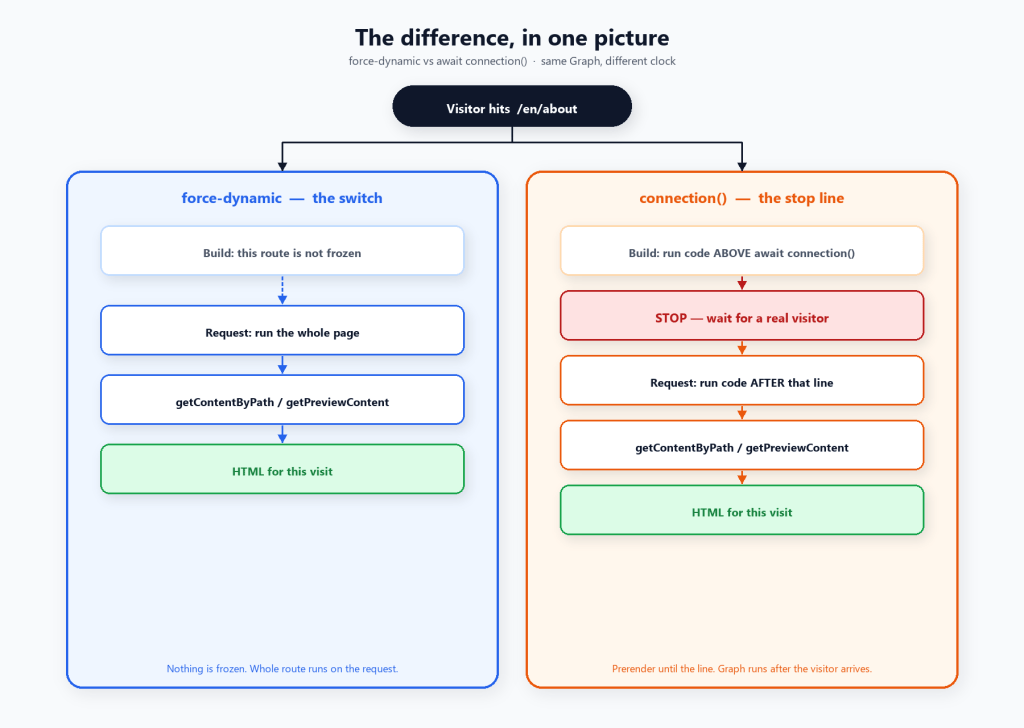
Read it left to right like your file.
force-dynamic never starts a freeze. The visitor arrives, the entire catch-all runs, Graph runs, HTML comes out.
connection() does start a freeze. Next runs everything above the line at build. It hits await connection() and waits. The visitor arrives. Only then does Graph run.
Put Graph above connection() and you are not using the stop line. You froze Graph again.
Final Thoughts
You already knew getContentByPath. The plot twist was the clock.
Next can save your CMS page. It can save the 404 too. You publish. Graph is right. The site still looks like yesterday.
So pick a clock.
- Whole catch-all, every visit →
force-dynamic - Stop here, then Graph →
await connection()
That is it. Not a new SDK method. Not a new query. One question before you ship: is this page live, or did Next already save it?
If you have to think, add the clock. Then publish. Then refresh. You should see Graph, not a ghost.
Happy Optimizing!!!
 Lets unveil Optimizely