If you’ve come to Optimizely SaaS from a conventional React codebase, the first thing to internalize is that you don’t own the render tree. Editors do.
In a normal app, the component hierarchy is decided at build time, by you, in JSX. In a CMS it’s decided at runtime, by whoever is composing the page in the editor. They drop a banner into a slot, and something has to work out that a banner content item should render as your BannerBlock.
That something is the registry. You declare the mapping once:
// registry.ts
registry.register(BannerBlockContent, BannerBlock);
…and from then on you render content, not components:
<OptimizelyComponent content={content.LeftBanner} />
OptimizelyComponent is a dispatcher. It reads the content’s __typename, finds the matching component in your registry, and renders it on your behalf. Your page type never names BannerBlock — and deliberately shouldn’t, because tomorrow an editor might drop a different content type into that slot and the page should still render.
The setup
Say your page type allows two banner slots:
{
  LeftBanner: ContentReference<BannerBlockContent>;
  RightBanner: ContentReference<BannerBlockContent>;
}
Both slots accept the same content type, BannerBlockContent, and both render through the same registered component, BannerBlock. An editor can put any banner in either slot.
On the page, you render them like this:
<OptimizelyComponent content={content.LeftBanner} />
<OptimizelyComponent content={content.RightBanner} />
Each instance needs to know which slot it’s in — left-aligned text on one, right-aligned on the other. That’s not editorial data; an editor shouldn’t set alignment: right on a banner whose whole identity is being the right-hand banner. It’s decided by the parent, so the parent has to pass it down — the way you’d write <BannerBlock position="right" /> in plain React.
Except there’s no <BannerBlock> here to put it on:
<OptimizelyComponent content={content.RightBanner} /> // ...and then what?
The parent never names the child, so there’s no element to hang a position prop on — the registry sits between them and appears to have swallowed the one channel you’d normally use for this.
The gap is types, not runtime
The SDK forwards any prop you pass to OptimizelyComponent, beyond the ones it knows about, straight through to the resolved child. It reserves only one exception: anything prefixed data-epi-, which it treats as preview and edit-mode metadata instead.
So this genuinely delivers position="right" to BannerBlock at runtime, no changes needed:
<OptimizelyComponent content={content.RightBanner} position="right" />
The public prop type only declares content, displaySettings, and tag — no index signature, so position gets rejected even though the runtime forwards it fine.
One wrapper, one cast
Instead of casting at every call site, wrap the component once and relax its type there:
import { OptimizelyComponent } from '@optimizely/cms-sdk/react/server';
import type { ComponentProps, ReactNode } from 'react';

type ForwardedProps = ComponentProps<typeof OptimizelyComponent> & Record<string, unknown>;

export const OptimizelyComponentWithProps = OptimizelyComponent as unknown as (
  props: ForwardedProps,
) => Promise<ReactNode>;
Known props stay typed; Record<string, unknown> allows the rest through. Behaviour is unchanged — same registry lookup, same rendering — this only relaxes what TypeScript is allowed to accept. The cast lives in one file with a comment explaining why, instead of an as any at every call site.
Parents then use the wrapper instead of the original:
<OptimizelyComponentWithProps content={content.LeftBanner} position="left" />
<OptimizelyComponentWithProps content={content.RightBanner} position="right" />
The child opts in like any normal component:
type Props = {
  content: BannerBlockContent;
  position?: 'left' | 'right';
};

export default function BannerBlock({ content, position }: Props) {
  const alignClass = position === 'right' ? 'text-right' : 'text-left';
  // ...
}
A parent needs to tell one of two identical banners which side it’s on — here’s how that single prop actually gets there.
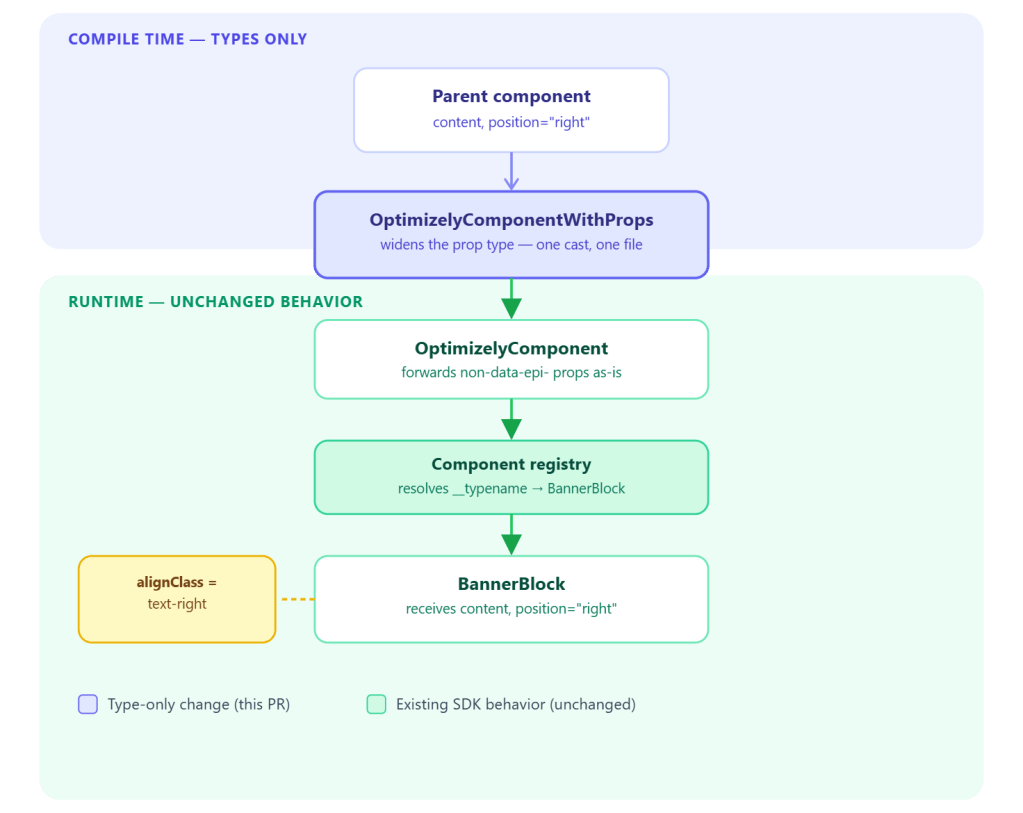
Props vs. context
The SDK also offers request-scoped context — setContextData and getContextData — for data every component in the request needs: the current page, locale, active theme. BannerBlock might already reach for getContextData('currentContent') for exactly that.
Context won’t work for position, though. It’s global to the request, so it can only hold one value at a time — but the left banner and right banner need different values simultaneously. Whichever one sets it last wins for both.
The rule: if two components rendering at once could disagree on the value, it’s a prop. If it’s true for the whole request regardless of which component asks, it’s context.
Final Thoughts
The registry model in code-first Optimizely looks like it closes off the one channel React gives you for parent-to-child data — the parent never names the child, so there’s no obvious place to hang a prop. It doesn’t. The SDK already forwards anything you pass beyond data-epi- metadata straight to the resolved child; the gap was never in the runtime, only in a closed TypeScript type that hadn’t caught up.
The fix is small on purpose: one wrapper, one cast, one comment explaining why — not a scattering of as any across every page type. And the deciding question for when to reach for this — prop or context — comes down to one thing: could two components rendering at the same time need different values? If yes, it’s a prop.
 Lets unveil Optimizely